Budget and resources
Budget against plan, and the people behind the numbers.
Record the budget plan, then log costs by category and vendor with who approved them. Costs link to the change requests that caused them, and charts show plan against actual by month.
The resource view lists each person's role, organisation, allocation, dates and daily rate. It projects the cost of the team and shows who rolls off next and how allocation splits across workstreams.

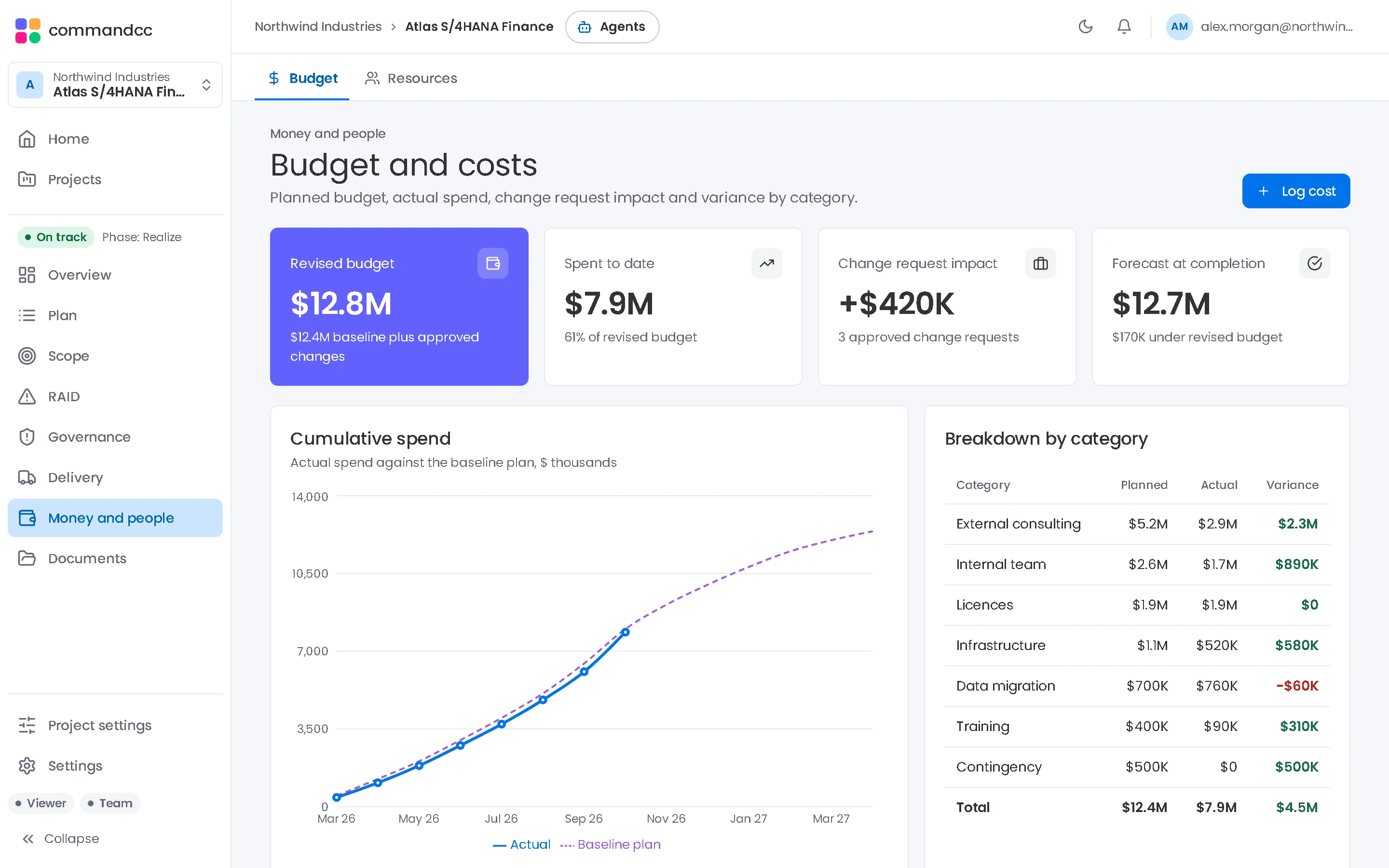
Budget and resources
Plan against actual spend, and who is allocated to which workstream.
What the module covers
Plan against actual
Budget plan lines and the cost log side by side, by category and by month.
Costs with a reason
Each cost records its vendor, whether it was budgeted, who approved it and the change request it belongs to.
Who is on the programme
Role, organisation, allocation, start and end dates and daily rate for client staff, integrator consultants and contractors.
What the team will cost
Projected cost from allocation and rate, upcoming roll-offs and allocation by workstream.
In the app, this module is these workspace tabs:
- Budget
- Resources
How a programme uses it
Set the plan
Enter the budget plan by category once the business case is approved.
Log and approve costs
Record invoices and commitments with their approver and, where it applies, the change request.
Watch the burn
Compare actual with plan each month, and check projected resource cost before the next extension.
Where it helps most
CIOs and programme directors
See spend against plan and the cost of approved changes without waiting for the month-end pack.
CommandCC for CIOs and programme directorsIndependent PMs and advisors
Keep the client's budget and the integrator's rates in one place you can show the sponsor.
CommandCC for independent PMs and advisors

Budget and resources: common questions
Can costs link to change requests?
Yes. A cost entry can reference the change request behind it, and approving a change request offers to create the cost entry.
Do resources include integrator staff?
Yes. Each resource records the organisation they work for, so client staff, integrator consultants and contractors sit in one list.
See this module with your programme in mind.
Tell us which application you are implementing and where the programme is today. We will show you how this module would hold your work.